Skillibrium 4.11 Release notes - 17 December 2025
RELEASE VERSION
Skillibrium 4.11
RELEASE DATE
December 17, 2025
INTRODUCTION
This release is focused on minor fixes and UI enhancements.
NEW FEATURES
1. Feature Title: Enhanced tracking and visibility for Notes & Questions in the sales process dashboard
Feature Module: Execute
Feature Group: Opportunity
Feature: Status tracking for Notes and Questions
Access: Execute > Opportunity > Sales process dashboard
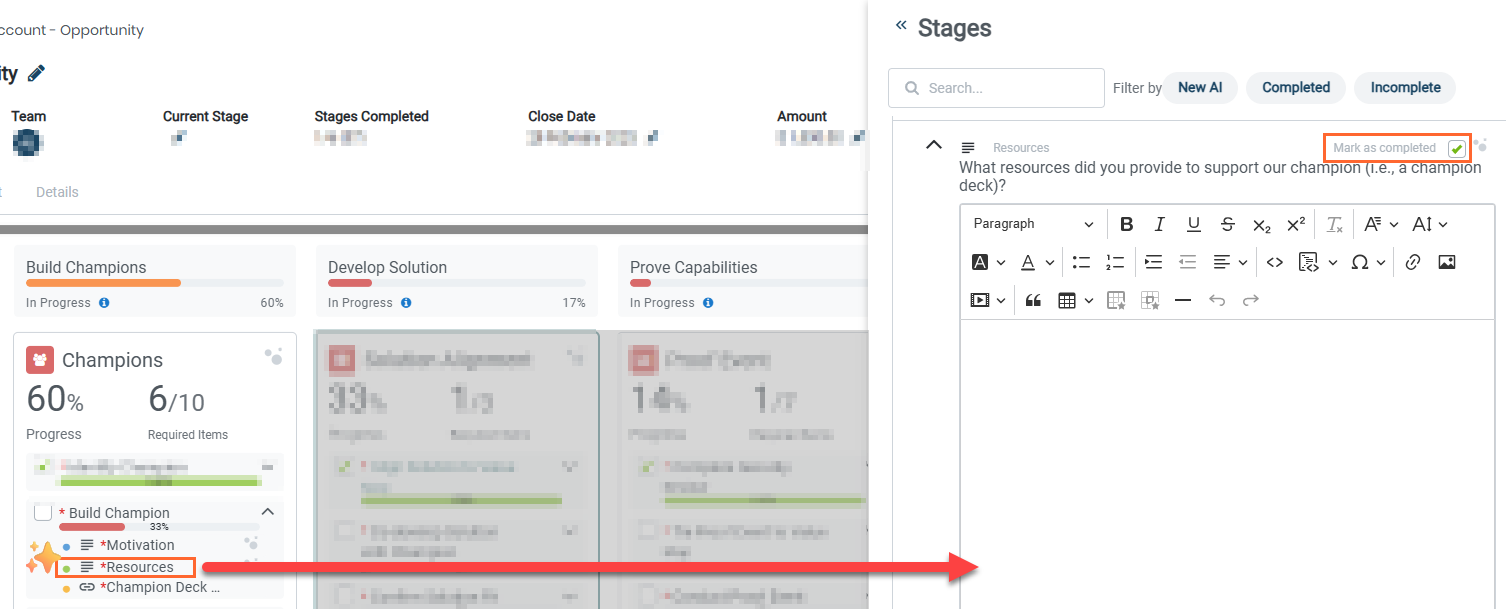
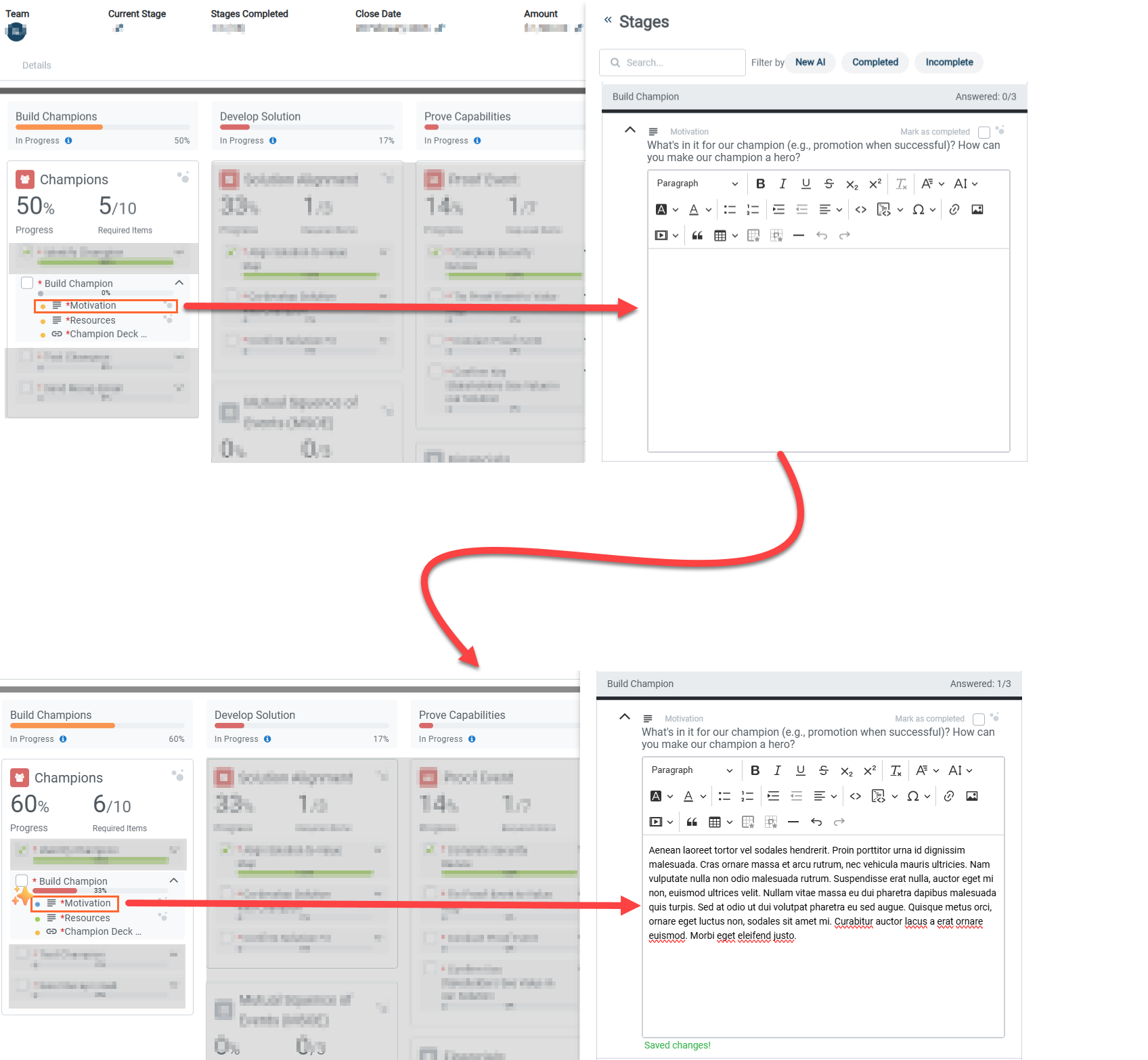
Description: We have upgraded how Notes & Questions items are tracked to give you better clarity on your workflow. Items now automatically transition to In Progress as you or the AI add content. To ensure reporting accuracy, we have also introduced a Completed (No Content) state for items marked as completed without answers. These new statuses are fully visible on your Execute Dashboard (By Opportunity playbook) for Skillibrium admins and included in all data exports.
2. Feature Title: Clear All filter pill has been added to clear existing filters on the Execute Dashboard view
Feature Module: Execute
Feature Group: Opportunity and Opportunity playbooks
Feature: Clear All filter pill
Access: Execute > Execute Dashboard
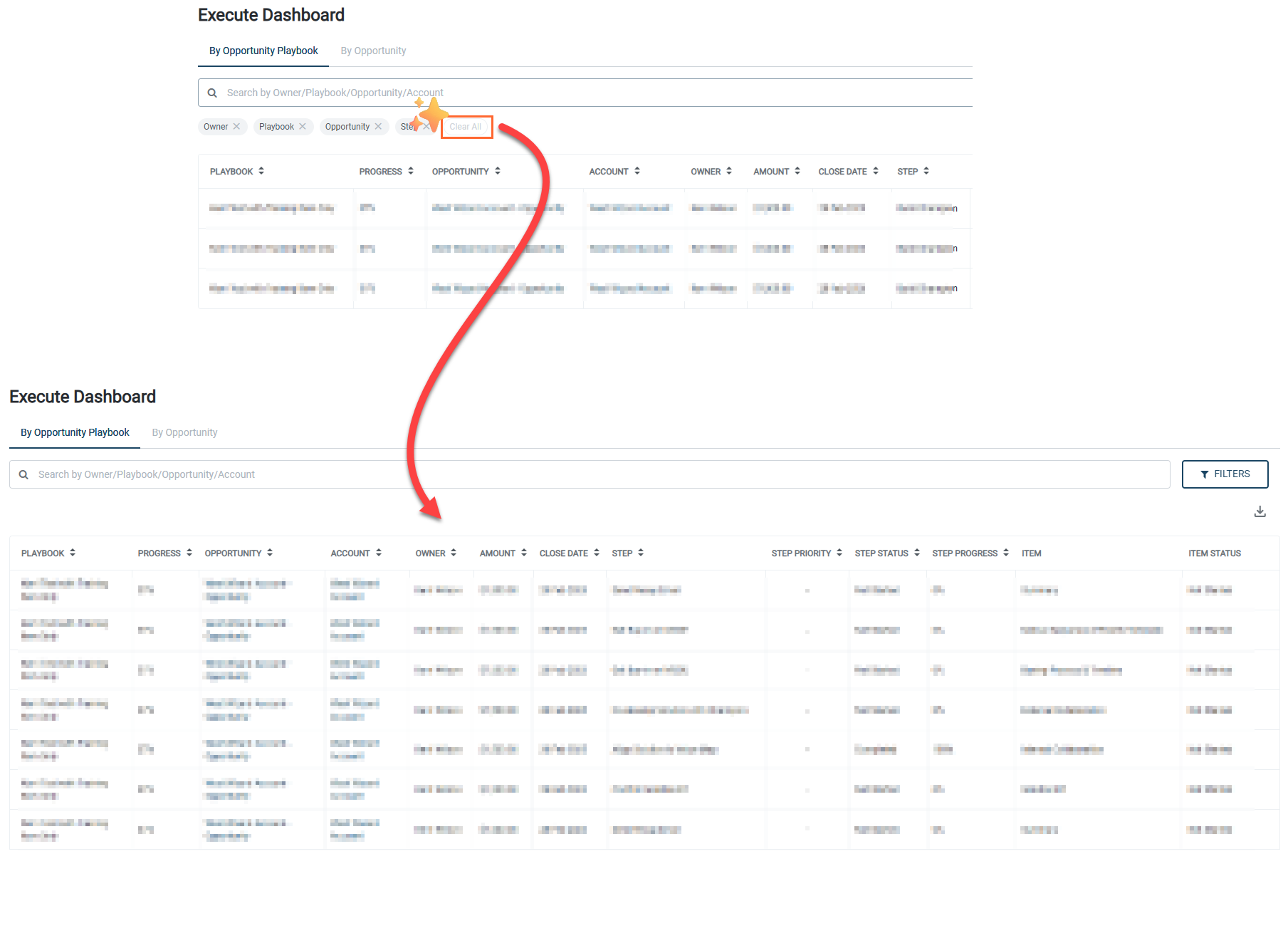
Description: When you have multiple filters active, a new "Clear All" pill will appear alongside your individual filter selections. Clicking this will instantly remove all active filters and refresh your list, saving you the effort of deleting the filters selected one by one.
BUG FIXES
1. Custom due dates set on step 2 (Set Review Date) of the Coach program now remain consistent when navigating through the program wizard steps.
Bug Number: BUG-1693
Feature Group: Coach programs
Feature: Set program review date
Access: Coach > Assessment Programs > Start a program
Description: We fixed an issue in Step 2 of the Coach program wizard where custom due dates set for the three assessment tasks would unexpectedly change when a user navigated from Step 3 and back to Step 2.
Applicable Roles: Administrators
Known Issue Release Notes: N/A
Status: Fixed in Production
2. Contacts with international characters will appear in contact list
Bug Number: BUG-2649
Feature Group: Accounts
Feature: Contact list
Access: Execute > Account > Add contact > Add international characters in the name field > do not mark the contact as a favorite > Save.
Description: We resolved an issue where newly created contacts containing special or international characters in their names were only visible when marked as a favorite. All contacts, regardless of the characters used in their names, will now correctly appear in the main contact list immediately after they are saved.
Applicable Roles: All
Known Issue Release Notes: Skillibrium 4.10 Release notes - 4 October 2025
Status: Fixed in Production
3. Currency updates now reflect immediately in the Opportunities table
Bug Number: BUG-2700
Feature Group: Opportunity
Feature: Currency field in the Opportunities table
Access: Execute > Opportunities
Description: We resolved an issue where changing the currency in the Details tab of an opportunity did not reflect in the Opportunities list table and the Opportunity header. In this release, the table will now correctly display the updated currency value as soon as your changes are saved.
Applicable Roles: All
Known Issue Release Notes: N/A
Status: Fixed in Production
4. Opportunity Next Step updates now reflect immediately without refreshing
Bug Number: BUG-2650
Feature Group: Opportunity
Feature: Next Step field in opportunity details tab
Access: Execute > Opportunities
Description: We fixed a synchronization issue where updates made to the Next Step field in the opportunity header were not appearing in the details section right away. You no longer need to refresh your browser to see these changes, the details section will now update automatically as soon as the opportunity header is modified.
Applicable Roles: All
Known Issue Release Notes: Skillibrium 4.10 Release notes - 4 October 2025
Status: Fixed in Production
5. Right-side panel header in an opportunity sales process dashboard now correctly syncs with selected Stages from the opportunity sales process dashboard
5. Right-side panel header in an opportunity sales process dashboard now correctly syncs with selected Stages from the opportunity sales process dashboard
Bug Number: BUG-2595
Feature Group: Opportunity
Feature: Opportunity sales process dashboard
Access: Execute > Opportunities
Description: We corrected a navigation issue where the right-side panel header would fail to update when selecting a step from a different stage on the main canvas. The header will now dynamically update to reflect the correct stage of whichever step you are currently viewing.
Applicable Roles: All
Known Issue Release Notes: N/A
Status: Fixed in Production
6. File deletion now enabled in Opportunity content tab.
Bug Number: BUG-2694
Feature Group: Opportunity
Feature: Content deletion
Access: Execute > Opportunities > content upload
Description: We resolved an issue that prevented users from deleting content previously uploaded to the Content tab of an opportunity. You can now successfully remove outdated or incorrect uploads, allowing you to keep your opportunity content organized and up to date.
Applicable Roles: All
Known Issue Release Notes: N/A
Status: Fixed in Production
7. Fixed layout alignment for large opportunity amounts in the opportunity header
Bug Number: BUG-2693
Feature Group: Opportunity
Feature: Opportunity sales process dashboard header
Access: Execute > Opportunities
Description: We corrected a styling issue where opportunity amounts exceeding seven digits would wrap to a second line, causing the header to look cluttered. The header layout has been adjusted to accommodate larger financial figures on a single line, ensuring that high-value opportunities are displayed clearly.
Applicable Roles: All
Known Issue Release Notes: N/A
Status: Fixed in Production
8. Improved performance and stability for Training Catalog filters
Bug Number: BUG-2516
Feature Group: Training catalog
Feature: Filter pills
Access: Learn > Training catalog
Description: We have optimized the filter pills within the Training Catalog to ensure a faster and more stable experience. Previously, unselecting any of the filters could cause the application to become unresponsive or trigger errors. This has been resolved, and you can now seamlessly toggle catalog filters without any performance delays or system crashes.
Applicable Roles: All
Known Issue Release Notes: N/A
Status: Fixed in Production
9. Improved visibility for the Training Dashboard
Bug Number: BUG-2526
Feature Group: Training dashboard
Feature: Action column of training dashboard table
Access: Learn > Training Dashboard
Description: We resolved a display issue on the Training Dashboard where the Action column was being cut off from the view, forcing users to zoom out their browsers to access it. The table layout has been adjusted to ensure that all columns, including the Action buttons, are fully visible and accessible across standard screen resolutions.
Applicable Roles: All
Known Issue Release Notes: N/A
Status: Fixed in Production
10. Video player overlay issue resolved in Training content's preview mode
Bug Number: BUG-2193
Feature Group: Training catalog
Feature: Training content's preview mode
Access: Learn > Training catalog > Training item > Details
Description: We fixed a visual bug in the Training content's preview mode where an unnecessary overlay was appearing on top of the video player.
Applicable Roles: All
Known Issue Release Notes: N/A
Status: Fixed in Production
11. Automatic closing for filter panel in Tasks
Bug Number: BUG-2683
Feature Group: Tasks
Feature: Filter panel
Access: Tasks > Filter panel
Description: We fixed an issue where the filter panel on the right would remain open after applying filters. The filter panel will now close automatically once your filters are applied.
Applicable Roles: All
Known Issue Release Notes: N/A
Status: Fixed in Production
12. Improved alignment for supervisor selection buttons on My Profile page
Bug Number: BUG-2557
Feature Group: My Profile
Feature: Supervisor or Team member profile selection
Access: Coach > My profile
Description: We fixed a layout issue on the profile page where the Yes and No radio buttons for the supervisor question would overlap when accessed via an invitation email. These options are now properly aligned.
Applicable Roles: All
Known Issue Release Notes: N/A
Status: Fixed in Production
13. Resolved metadata connected file and image upload failures in Learn and Execute
Bug Number: BUG-2667
Feature Group: -
Feature: Image and file uploads
Access:
a) Execute > Opportunity > select an opportunity > Content tab > upload content
b) Learn > Training catalog > + New
Description: We fixed the issue with uploading images with metadata in Learn and Execute, or files within the Opportunity Content tab. You can now successfully upload all supported file types and images without interruption.
Applicable Roles: All
Known Issue Release Notes: Skillibrium 4.10 Release notes - 4 October 2025
Status: Fixed in Production