Skillibrium 4.10 Release notes - 4 October 2025
RELEASE VERSION
Skillibrium 4.10
RELEASE DATE
October 4, 2025
INTRODUCTION
This release is focused on Execute enhancements and bug fixes in Execute and Learn.
NEW FEATURES AND ENHANCEMENTS
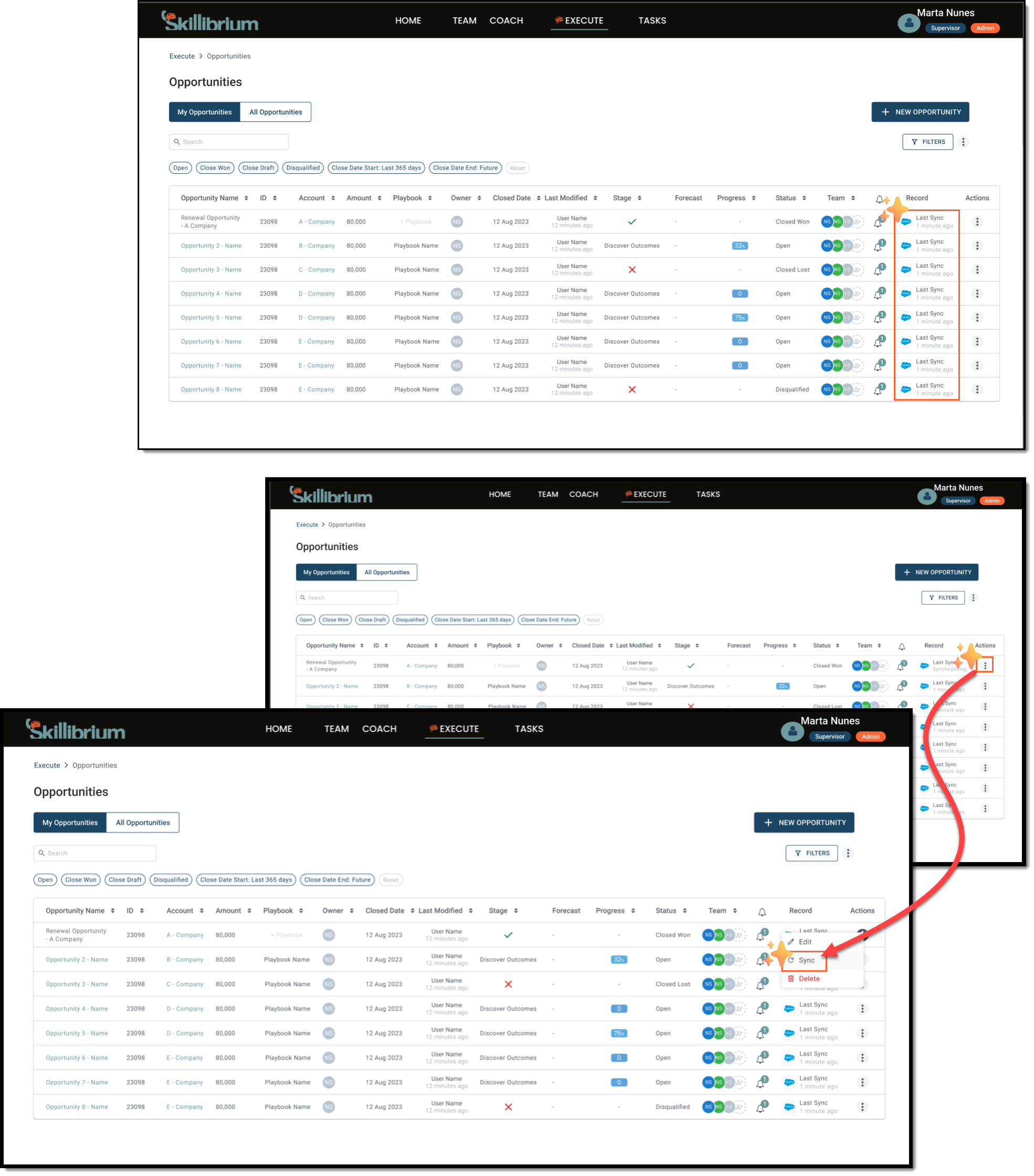
1. Opportunity sync and display capabilities in the opportunity list
Feature Module: Execute
Feature Group: Opportunity
Feature: Sync display status in opportunity list
Access: Execute > Opportunities
Description: You can now easily see when each opportunity was last synced, along with the CRM it came from, directly from the opportunity list. We have also added the option to sync individual opportunities from the actions menu in the opportunity list for quicker updates.
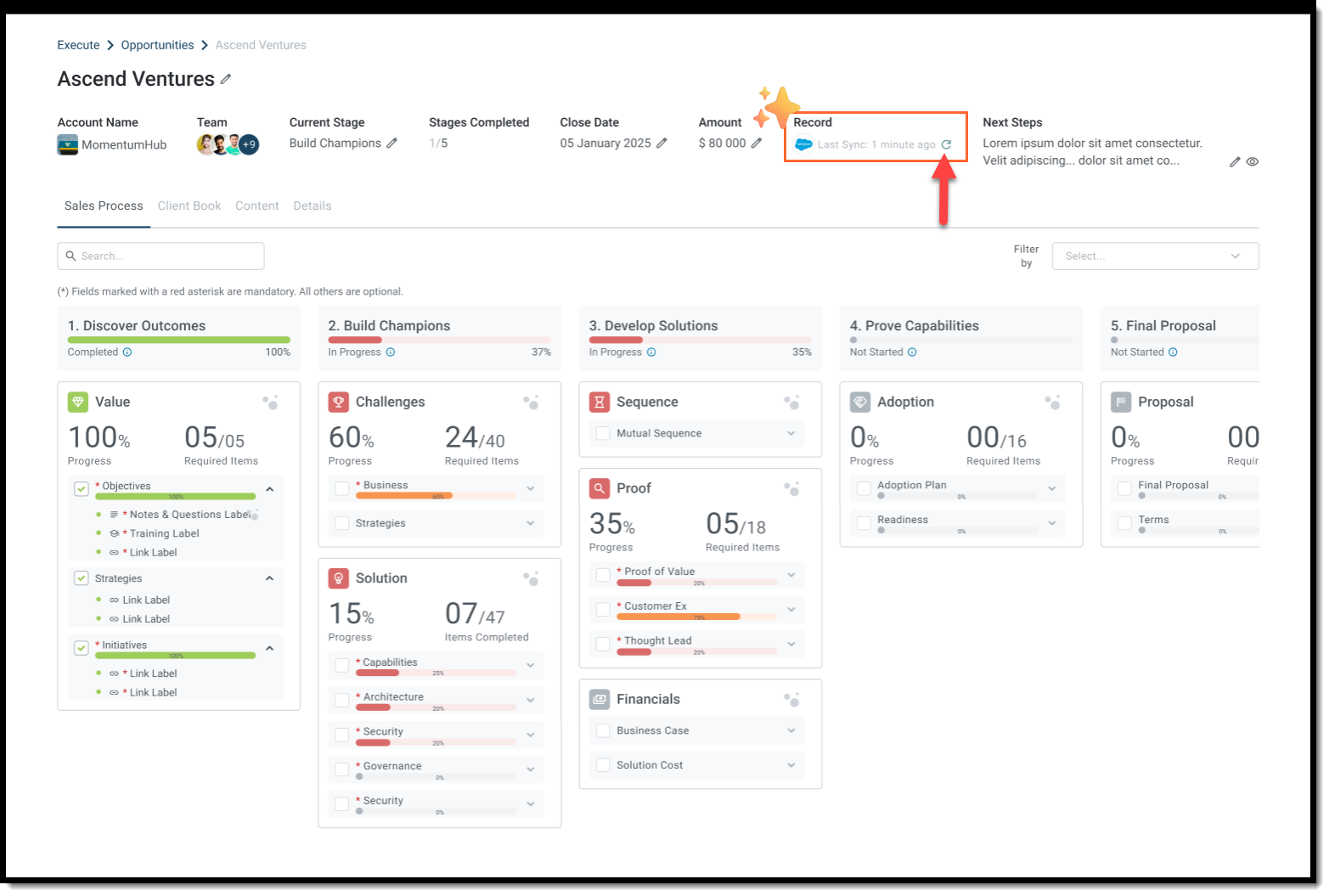
2. Opportunity sync and display capabilities in the header of an opportunity
Feature Module: Execute
Feature Group: Execute > Opportunities > select an opportunity > view the header of the opportunity
Feature: Sync display icon and status display in the header of an opportunity
Access: Execute > Opportunities > select an opportunity
Description: When viewing an opportunity, the header now shows the last sync time and the CRM it was retrieved from. You can also quickly sync that specific opportunity directly from the header for up-to-date information.
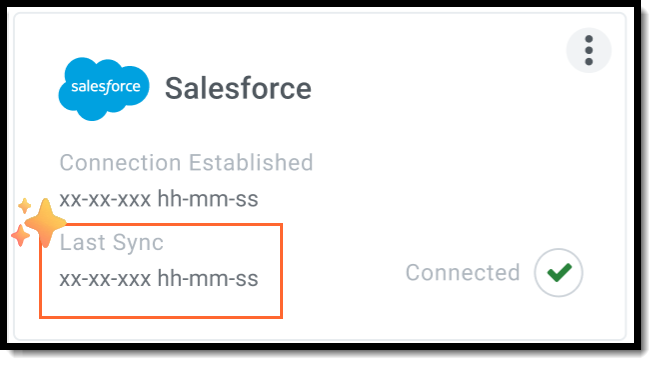
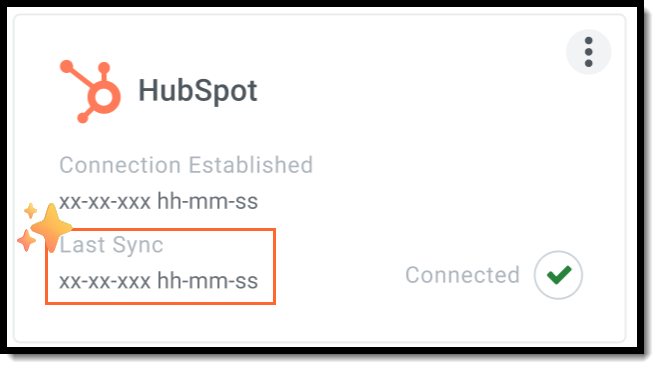
3. Clearer integration sync information in company settings for CRM and HRIS connection cards
Feature Module: Settings
Feature Group: Company settings
Feature: Integration cards
Access: User menu > Company settings > Integrations > Your integrations
Description: CRM and HRIS Integration cards in Company Settings now display a dedicated Last Sync date instead of the initial connection date. This helps admins quickly see when each connected system (CRM or HRIS) last synced, making it easier to monitor data freshness and connection health.
4. Flexible amount entry for an opportunity
Feature Module: Execute
Feature Group: Opportunity
Feature: Amount entry for an opportunity
Access: Execute > Opportunities or click an opportunity > click the details tab
Description: Users can now enter an opportunity amount of $0. The previous restriction that prevented entering $0 has been removed, allowing for more accurate representation of all opportunity types.
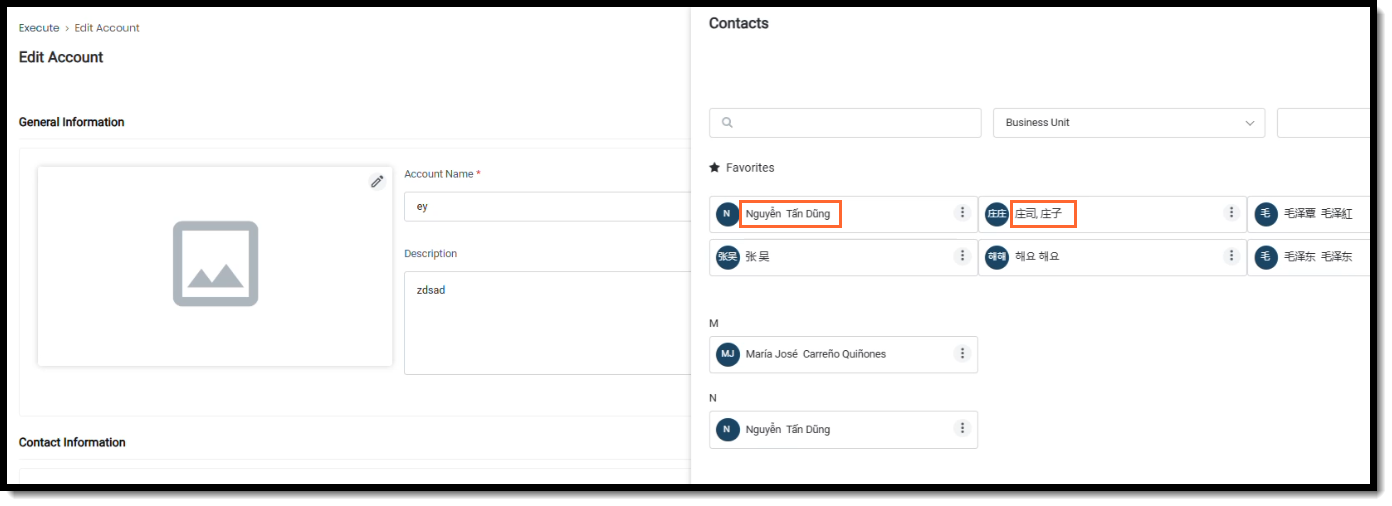
5. Support for international characters in contact names
Feature Module: Execute
Feature Group: Contacts
Feature: Adding international characters in the name fields for contacts
Access: Execute > Accounts > open an account > Add contact
Description: You can now use international characters in contact name fields. This update makes it easier to accurately enter and display names from different languages and regions. Note that this does not include non-Latin alphabets (for example: Arabic, Chinese, Japanese etc) yet.
BUG FIXES
1. A default image is now shown for trainings uploaded without an image in the training catalog.
Bug Number: BUG-2476
Feature Group: Training Catalog
Feature: Viewing a training catalog
Access: Learn > Training Catalog
Description: We added a default image that appears automatically when no image has been uploaded for a training. This ensures all trainings have a consistent visual appearance, even if a custom image hasn’t been provided.
Applies to: Administrators
Known Issue Release Notes: N/A
Status: Fixed in production
2. Breadcrumb navigation is now consistent across all pages.
Bug Number: Bug 2576
Feature Group: -
Feature: Breadcrumb navigation
Access:
Access:
- Learn > Training Catalog
- Execute > Account or Opportunity page
- Coach (All pages)
Description: We fixed an issue where breadcrumb navigation was missing from some Account, Opportunities, and Coach pages. Breadcrumbs now appear consistently throughout these sections, improving navigation and overall user experience.
Applies to: All
Known Issue Release Notes: N/A
Status: Fixed in production
KNOWN ISSUES AND LIMITATIONS
1. Contacts with international characters not showing in contact list
Bug Number: Bug-2649
Feature Group: Accounts
Feature: Contact list
Access: Execute > Account > Add contact > Add international characters in the name field > do not mark the contact as a favorite > Save.
Description: When a new contact includes special or international characters in their name (for example, accents or non-English letters), the contact may not appear in the contact list unless it’s marked as a favorite. The contact is still saved successfully, but it’s not visible in the main list.
Applicable Roles: All
Workaround: Mark the contact as a favorite for it to show in the contact list.
Status: To be fixed before the next release.
2. Next Step updates are not updating immediately in the Opportunity details
Bug Number: Bug-2650
Feature Group: Opportunity
Feature: Updating next steps of an opportunity from the header
Access: Execute > Opportunity > Select an opportunity > Update the Next steps in the header section of the opportunity > Check the Next steps field in the details section.
Description: When the Next Step is updated from the header section in an opportunity, the change does not show up in the details section right away. The page needs to be refreshed for the update to appear.
Applicable Roles: All
Workaround: Users will need to refresh the page for the changes to reflect in the opportunity details section.
Status: To be fixed before the next release.
3. Users may experience problems when uploading files or images with metadata in Learn and Execute.
Bug Number: Bug-2667
Feature Group: -
Feature: Image and file uploads
Access:
a) Execute > Opportunity > select an opportunity > Content tab > upload content
b) Learn > Training catalog > + New
Description: When trying to upload images with metadata in Learn and Execute, or files in Execute > Opportunity > Content, the upload may fail or not complete properly.
Applicable Roles: All
Workaround: Our team is currently working on a fix to ensure that both files and their related details (metadata) upload correctly. There is no workaround currently.
Status: To be fixed in the next release.