Skillibrium 5.4 Release Notes - 14 July 2026
RELEASE VERSION
Skillibrium 5.4
RELEASE DATE
July 14, 2026
INTRODUCTION
This release is focused on Coach enhancements.
ENHANCEMENTS
1. Enhanced participant onboarding for assessment programs
Feature Module: Coach
Feature Group: Assessment Programs
Feature: Add Participants to Coach program
Access: Coach > Assessment programs > Start a Program > Step 3 (Add Participants)
Description: We have redesigned the participant management experience for assessment programs. Admins can still add participants individually, but now they can also search, filter, and add participants in bulk. A downloadable template is also available to simplify bulk uploads.
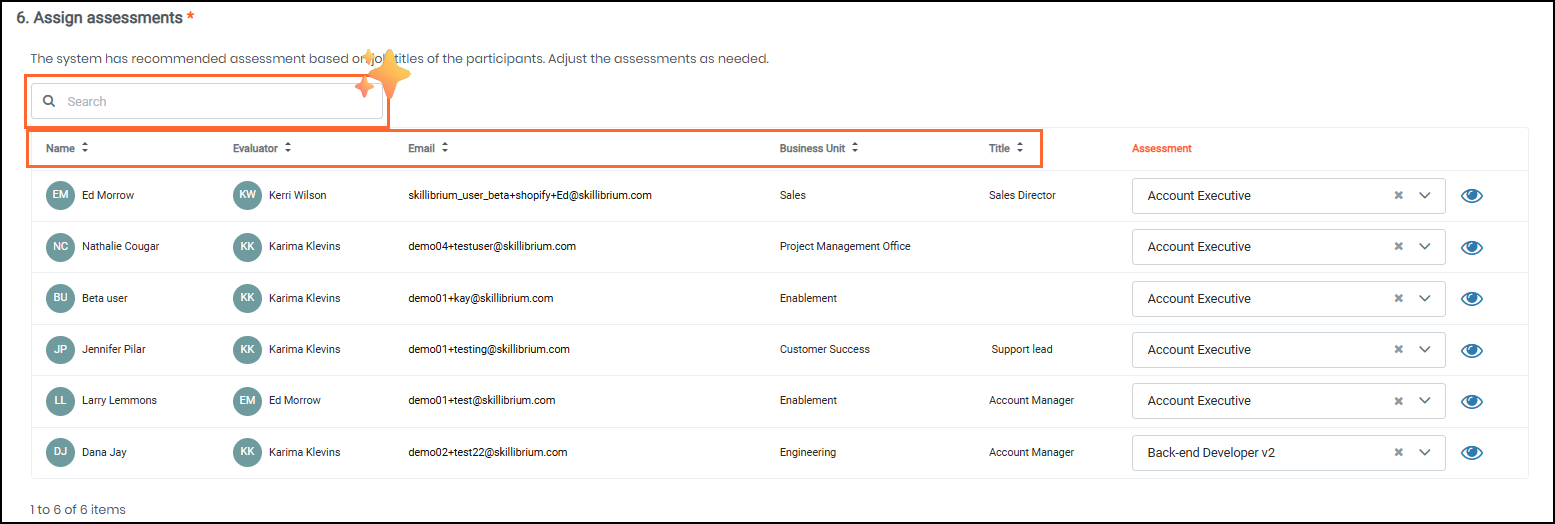
2. Search and sorting capabilities for assigning assessments
Feature Module: Coach
Feature Group: Assessment Programs
Feature: Assigning Assessments
Access: Coach > Assessment programs > Step 6 (Assign Assessments)
Description: Managing large assessment programs just got easier. When assigning assessments in Step 6 of the assessment program wizard, you can quickly locate participants using a new search bar that scans names, evaluators, emails, and business units. We have also added the ability to sort your list by Business Unit, Job Title, and Assessment status, with unassigned assessments automatically appearing at the top.
KNOWN ISSUES AND LIMITATIONS
1. Incorrect error message when uploading an empty template file in step 3 of the Coach assessment program wizard
Bug Number: Bug-2993
Feature Group: Coach
Feature: Assessment Program
Access: Coach > Assessment Program > Step 3 - Add Participants > Upload an empty .xlsx or .csv file
Description: Uploading an empty template file on Step 3 of the assessment program wizard displays an incorrect validation error message.
Applicable Roles: Administrators
Workaround: None
Status: To be fixed in the next release
2. Comma-separated email addresses wrapping to a new line are flagged as unregistered in step 3 of the Coach assessment program wizard
Bug Number: Bug-2294
Feature Group: Coach
Feature: Assessment Program
Access: Coach > Assessment Program > Step 3 - Add Particpants > Enter emails separated by comma
Description: When adding participants using comma-separated emails, text that automatically wraps to the next line due to the box size may be incorrectly marked as an unregistered email error. The email addresses remain valid, but the visual wrapping triggers a false format error.
Applicable Roles: Administrators
Workaround: None
Status: To be fixed in the next release
3. Inconsistent results displayed when using the right panel filters versus filtering by Training on the Training Dashboard page
Bug Number: Bug-3003
Feature Group: Learn
Feature: Filters
Access: Learn > Training Dashboard > check By Training
Description: On the Training Dashboard, if you filter by a specific user's name and then clear the "By Training" filter, the dashboard continues to display filtered results instead of automatically resetting to show all training, which is inconsistent with results displayed when using filters on the right panel.
Applicable Roles: Administrators
Workaround: None
Status: To be fixed in the next release