Skillibrium 5.1 Release notes - 26 March 2026
RELEASE VERSION
Skillibrium 5.1
RELEASE DATE
March 26, 2026
INTRODUCTION
This release is focused on bug fixes in Execute and UI enhancements in Execute, Coach and Learn.
ENHANCEMENTS
1. Dashboard filtering by leaders/supervisors and participants
Feature Module: Coach
Feature Group: Assessment dashboard
Feature: Assessment dashboard filters
Access: Coach > Assessment dashboard
Description: We have enhanced the Assessment Dashboard to provide deeper visibility into team performance. You can now filter programs by Leader to view assessments for only the employees under their management. Additionally, we have updated the Selected People filter to Filter by Participant for better clarity and added a new column in the participants table to display each participant's assigned Leader. These updates allow Skillibrium admins to quickly toggle between different organizational views and focus on the specific data sets that matter most for their reporting.
2. Enhanced participant search on Training enrollments
Feature Module: Learn
Feature Group: Manage Training
Feature: Search
Access: Learn > Training catalog > Manage training
Description: To help you manage large-scale training more efficiently, we have added a search bar to assignments and self study enrollments sections. This update allows you to quickly locate individuals by typing names, emails, business units, job titles, or even the name of the person who assigned the training.
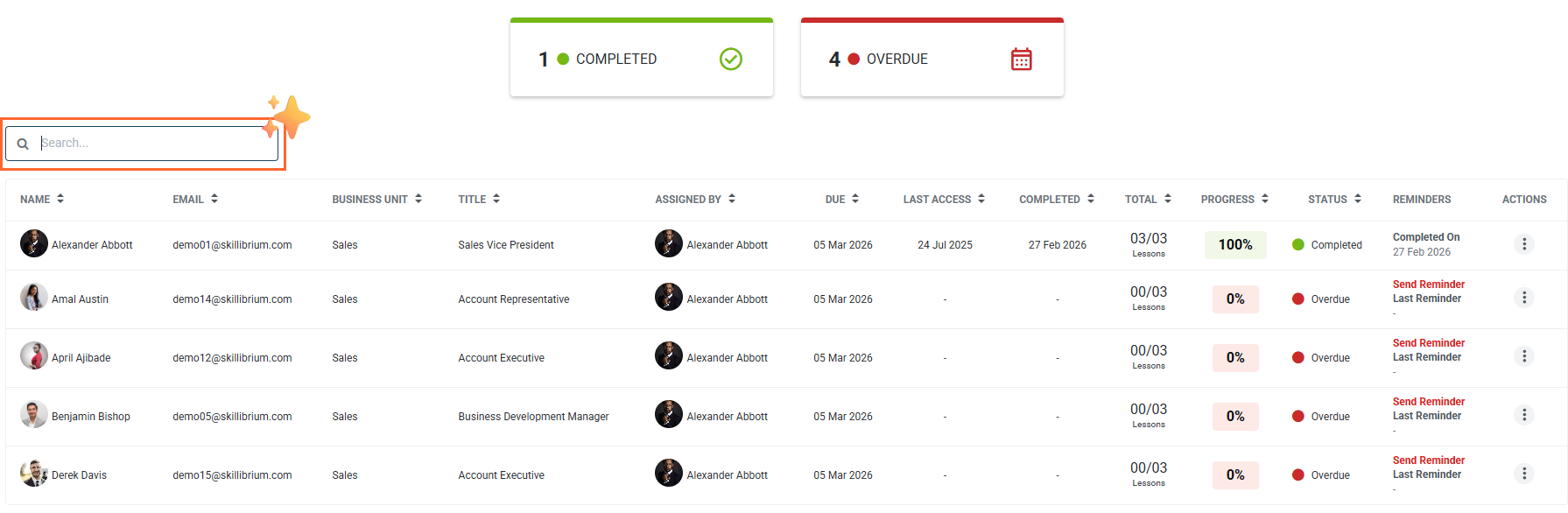
3. Manage training now opens in a new tab
Feature Module: Learn
Feature Group: Manage Training
Feature: New tab
Access: Learn > Training catalog > Manage training
Description: We have updated the Training Catalog to open training details in a new browser tab. Previously, navigating back from a specific training record would reset your active filters and selections, forcing you to start your search over. With this update, your original Training Catalog view including all applied filters and pill selections remains active and untouched in its own tab. This allows you to manage multiple participants or review various courses back-to-back without losing your place or your filtered data.
BUG FIXES
1. Visual alignment of row tools in Stage categories
Bug Number: Bug-2429
Feature Group: Playbooks
Feature: Playbook creation
Access: Execute > Playbooks > New playbook
Description: We have resolved a UI alignment issue where row tool icons in the Playbook Stage categories did not perfectly line up with their corresponding fields. These icons are now correctly centered and aligned, providing a cleaner and more consistent visual experience when managing your stages.
Applicable Roles: Admin
Known Issue Release Notes: Skillibrium 5.0 Release notes - 10 February 2026
Status: Fixed in production
2. Instant search reset on the Execute Dashboard
Bug Number: Bug-2741
Feature Group: Execute Dashboard
Feature: Search
Access: Execute > Execute dashboard
Description: We have optimized the search functionality within Dynamic reports to ensure a smoother user experience. Previously, clearing the search input would trigger a prolonged loading state, causing unnecessary delays when trying to return to the default table view. This has been resolved so that clearing your search now immediately restores the full, unfiltered data list without additional loading time, allowing for much faster navigation and reporting.
Applicable Roles: Admins
Known Issue Release Notes: N/A
Status: Fixed in production
3. Case-insensitive search in Sales Reports
Bug Number: BUG-2800
Feature Group: Opportunity sales process
Feature: Search
Access: Execute > Opportunity sales process > Sales right panel
Description: We have improved the search functionality within the Sales Report right panel to ensure more consistent and reliable results. Previously, the search was case-sensitive, meaning users would miss relevant entries if their search term didn't perfectly match the capitalization of the record. The search is now case-insensitive, allowing you to find what you need regardless of whether you use uppercase or lowercase letters.
Applicable Roles: All
Known Issue Release Notes: N/A
Status: Fixed in production
4. Search bar stability in the Training Catalog
Bug Number: BUG-2784
Feature Group: Training Catalog
Feature: Search
Access: Learn > Training catalog > Search for a training
Description: We have resolved a UI layout issue where the search bar in the Training Catalog would shift position or expand as text was entered. This behavior caused a distracting jumping effect on the page while typing. The search input field has now been fixed to a stable size and position.
Applicable Roles: All
Known Issue Release Notes: N/A
Status: Fixed in production
5. Automatic reset when clearing user filters in Training Dashboard
Bug Number: BUG-2785
Feature Group: Training Dashboard
Feature: Filters
Access: Learn > Training dashboard
Description: We have fixed an issue where clicking Clear All on the user filter pills in the Training Dashboard would not properly reset the table. Previously, even after clearing the selections, the dashboard would continue to show the filtered results instead of returning to the full, default view. This has been corrected so that removing filter pills now instantly refreshes the table to show all data, ensuring your dashboard views accurately reflect your current filter selections.
Applicable Roles: All
Known Issue Release Notes: N/A
Status: Fixed in production
6. Corrected progress color indicators in the Training Catalog
Bug Number: BUG-2804
Feature Group: Training Catalog
Feature: -
Access: Learn > Training catalog (list view)
Description: We have resolved a visual bug in the Training Catalog's list view where progress bars were displaying incorrect colors
Applicable Roles: All
Known Issue Release Notes: N/A
Status: Fixed in production
7. Smart visibility for training action buttons
Bug Number: BUG-2806
Feature Group: Manage Training
Feature: -
Access: Learn > Training Catalog > Manage Training
Description: To provide a cleaner and more intuitive user interface, we have updated the Manage Training section to dynamically hide the action button when no actions are available for a specific training item.
Applicable Roles: Admins
Known Issue Release Notes: N/A
Status: Fixed in production
8. Corrected data mapping in Assessment Program exports
Bug Number: BUG-2835
Feature Group: Assessment Program
Feature: File export for Download Details and Download Results
Access: Coach > Assessment Program > Click the three dots above the program details table > Select Download Results or Download Details
Description: We have resolved an issue in the Assessment Program Export where the Assessment Title column was incorrectly pulling the program name instead of the specific assessment template name.
Applicable Roles: Administrators and Supervisors
Known Issue Release Notes: N/A
Status: Fixed in production