Skillibrium 4.9 Release notes - 1 October 2025
RELEASE VERSION
Skillibrium 4.9
RELEASE DATE
October 1, 2025
INTRODUCTION
This release is focused on Execute Dashboard enhancements and bug fixes in Execute, Coach, Learn, and the Skillibrium home page.
NEW FEATURES
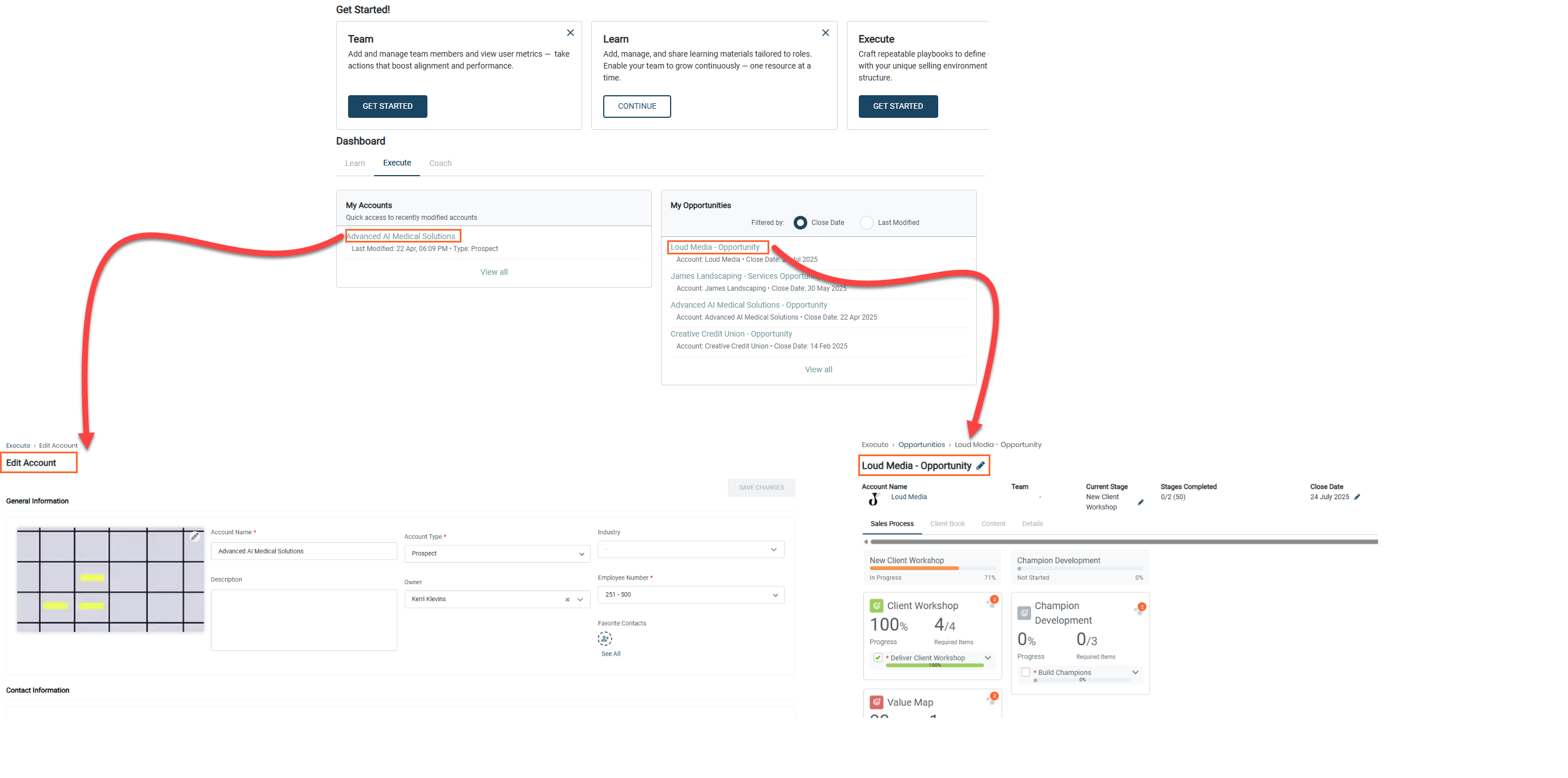
1. Open an account or opportunity page from My accounts/My opportunity on the Skillibrium homepage dashboard.
Feature Module: Execute
Feature Group: Homepage
Feature: URL hyperlink
Access: Homepage > Execute tab > Click on an account
Homepage > Execute tab > Click on an opportunity
Description: All accounts and opportunities linked on the Skillibrium homepage dashboard under the Execute tab will open up the account details page and opportunity sales process page, respectively, in a new tab.
ENHANCEMENTS
Execute Dashboard
- Improved performance
- Filter buttons now open in a right panel
- Filter removed for Items, Item Status, and Item progress
- Addition of the input text search box
- Users can search based on:
- Owner
- Playbook
- Opportunity
- Account
BUG FIXES
1. The updated template name now displays correctly on edit.
Bug Number: BUG-2529
Feature Group: Opportunity
Feature: Adding a new template
Access: Execute > Opportunity > select an opportunity > sales process tab
Description: When editing, the updated template name was not displaying as expected. This issue affected both the Opportunity Sales Process and the Content tab. The display issue has been resolved to ensure the correct template name appears during editing.
Applicable Roles: All
Known Issue Release Notes: N/A
Status: Fixed in production
2. No more warning popups displayed when uploading a photo to Contacts.
Bug Number: BUG-2510
Feature Group: Accounts
Feature: Upload contact photo
Access: Execute > Edit Account > Click on contact icon > upload contact photo
Description: A warning message was incorrectly displayed when users uploaded a photo in the Contacts section of Accounts. This issue has been fixed to ensure photo uploads no longer trigger unnecessary warnings.
Applicable Roles: All
Known Issue Release Notes: N/A
Status: Fixed in production
3. ‘X’ button added on large organization trees
Bug Number: BUG-2547
Feature Group: My Org tree
Feature: Closing the organization tree
Access: Coach > Assessment Dashboard > Click on Org tree icon
Description: When the organization tree was expanded to a large size, the ‘X’ button was not visible, preventing users from easily closing the tree. This issue has been fixed to ensure the close button remains accessible regardless of tree size.
Applicable Roles: Admin or Supervisor
Known Issue Release Notes: N/A
Status: Fixed in production
4. Business units are now alphabetically arranged in assessment templates.
Bug Number: BUG-2496
Feature Group: Assessment templates
Feature: Business units
Access: Coach > Assessment templates > Business unit dropdown list
Description: The list of business units in assessment templates was not displayed in alphabetical order, making it harder for users to locate specific units. The list has been updated to display business units alphabetically.
Applicable Roles: All
Known Issue Release Notes: N/A
Status: Fixed in production
5. Learning Paths can be created successfully.
Bug Number: BUG-2564
Feature Group: Training Catalog
Feature: Learning path creation
Access: Learn > Training Catalog > click + New Learning Path > Add details > click Create Learning Path
Description: We resolved an issue that caused the creation of a Learning Path to fail due to a database error. Additionally, the default "All" value in the Visibility field was incorrectly marked as required upon submission, which prevented successful creation of learning path.
Applicable Roles: Admin
Known Issue Release Notes: N/A
Status: Fixed in production
6. The 'Team Get started' card now displays correctly for supervisors and administrator profiles.
Bug Number: BUG-2533
Feature Group: SKillibrium Homepage
Feature: Team Get Started
Access: Skillibrium homepage
Description: We resolved an issue where the “Team Get Started” card was not appearing for users with a Supervisor and Admin profile. The card now displays correctly for all intended user roles.
Applicable Roles: Administrators and Supervisors
Known Issue Release Notes: N/A
Status: Fixed in production
7. “View All” link on Learn tab now correctly navigates to the right page.
Bug Number: BUG-2554
Feature Group: Skillibrium Homepage
Feature: Learn tab
Access: Skillibrium Homepage > click Learn tab
Description: The “View All” link on the Learn tab of the Skillibrium home page redirected users to an incorrect page. The link now correctly navigates to the right page.
Applicable Roles: All
Known Issue Release Notes: N/A
Status: Fixed in production
8. The correct buttons are now displayed based on the training status on Skillibirum homepage - learn tab.
Bug Number: BUG-2535
Feature Group: Skillibrium Homepage
Feature: Learn tab
Access: Skillibrium Homepage > Learn tab
Description: Wrong action buttons were shown on training cards on the home page. The correct buttons are now displayed based on the training status.
Applicable Roles: All
Known Issue Release Notes: N/A
Status: Fixed in production