Skillibrium 4.6 Release notes - 10 July 2025
RELEASE VERSION
Skillibrium 4.6
RELEASE DATE
July 10, 2025
INTRODUCTION
This release is focused on bug fixes and UI enhancements in Execute, Coach and Learn.
NEW FEATURES/ENHANCEMENTS
1. Feature Title: Client Book Performance Improvement
Feature Module: Execute
Feature Group: Opportunity
Feature: Client Book
Access: Execute > Opportunity > Client Book tab
Description: Significant improvement in loading the client book.
2. Feature Title: Client Book Improvements
Feature Module: Execute
Feature Group: Client Book
Feature: Client Book
Access: Execute > Opportunity > Client Book tab `
Feature: Client Book
Access: Execute > Opportunity > Client Book tab `
Description:
a) Previous client book display viewer replaced with a PDF viewer.
a) Previous client book display viewer replaced with a PDF viewer.
b) Enabling users to save changes from the right panel's Branding and Index tabs.
c) The label 'Cover page' replaced with 'Branding'.
d) Removal of the preview and export buttons from the right panel.
3. Feature Title: Editable Opportunity Details
Feature Module: Execute
Feature Group: Opportunity
Feature: Edit Opportunity details
Access: Execute > Opportunity > Details tab
Description: For any opportunity created locally, all the list of items are editable in details tab. The fields are not editable in an integrated Skillibrium environment.
4. Feature Title: Enabling dashboard interaction while right panel is open in the sales process tab.
Feature Module: Execute
Feature Group: Opportunity
Feature: Sales process dashboard cards
Access: Execute > Opportunity > Sales process tab
Description: Users can now manage the cards in the sales process dashboard while the right panel is open.
5. Feature Title: My Team page view depends on the logged in user's role.
Feature Module: Coach
Feature Group: My Org/My Team
Feature: My Team's view for leaders and contributors.
Access: My Team
Description:
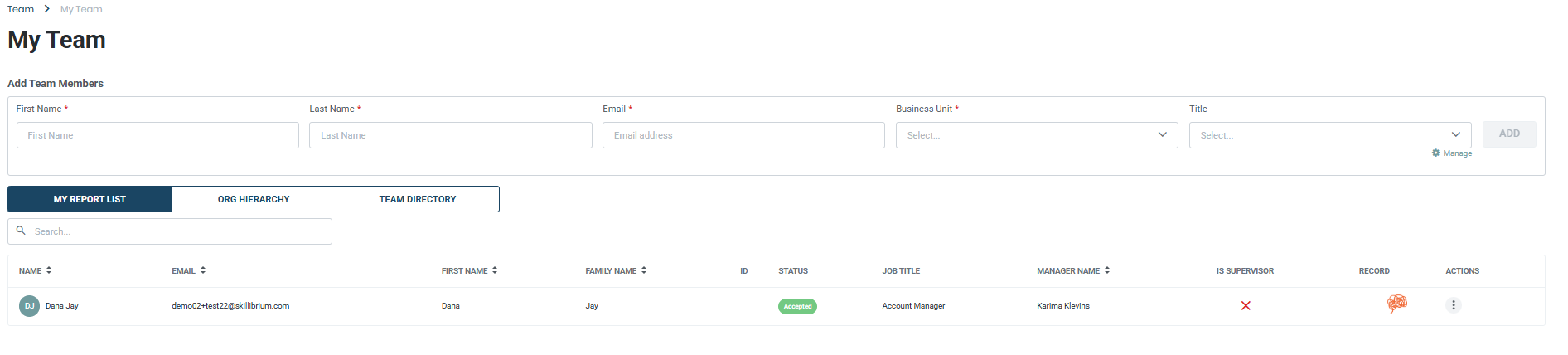
Supervisors with direct reports or descendants will see the My report list, Org hierarchy and Team directory tabs.
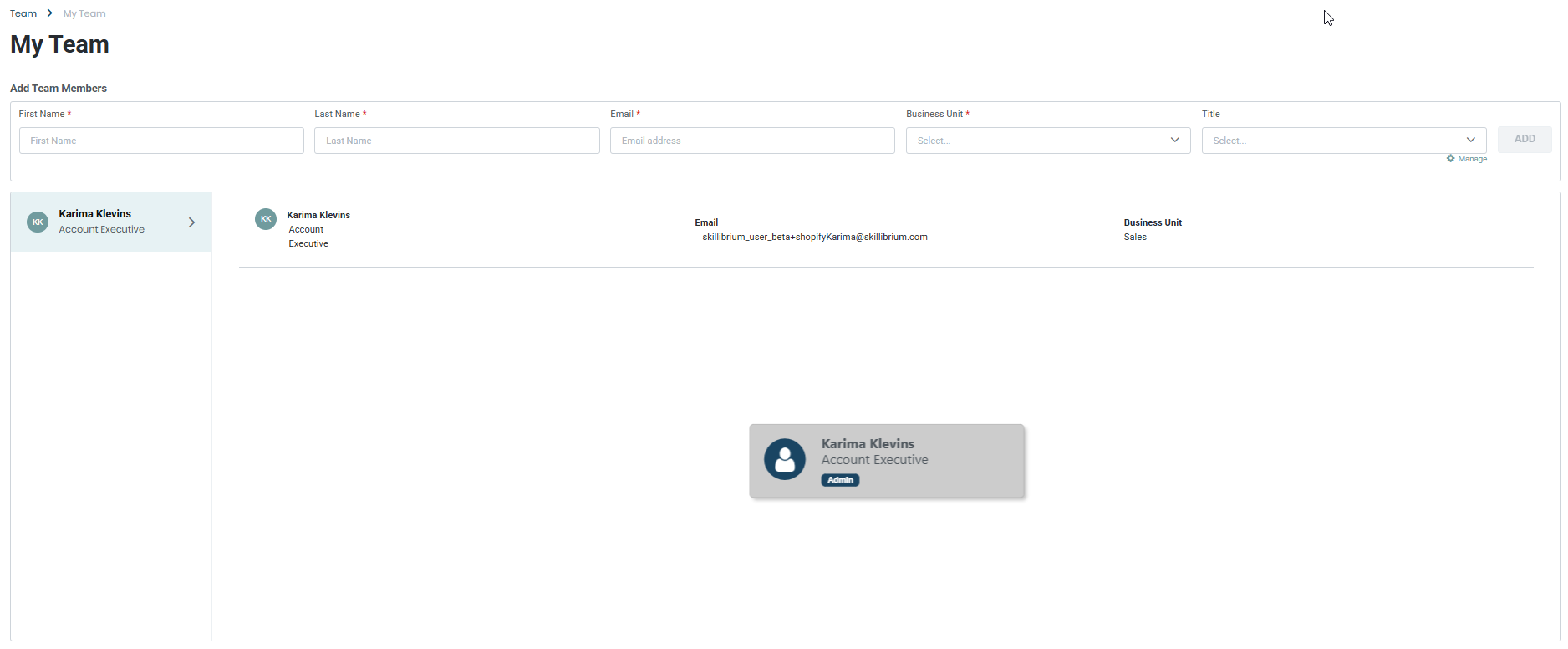
Supervisors with no direct reports or descendants will only see the directory card of the logged-in user.
Contributors will see the team directory's view allowing them to search through the directory using first or last name and email address.
Supervisors with direct reports or descendants will see the My report list, Org hierarchy and Team directory tabs.
Supervisors with no direct reports or descendants will only see the directory card of the logged-in user.
Contributors will see the team directory's view allowing them to search through the directory using first or last name and email address.
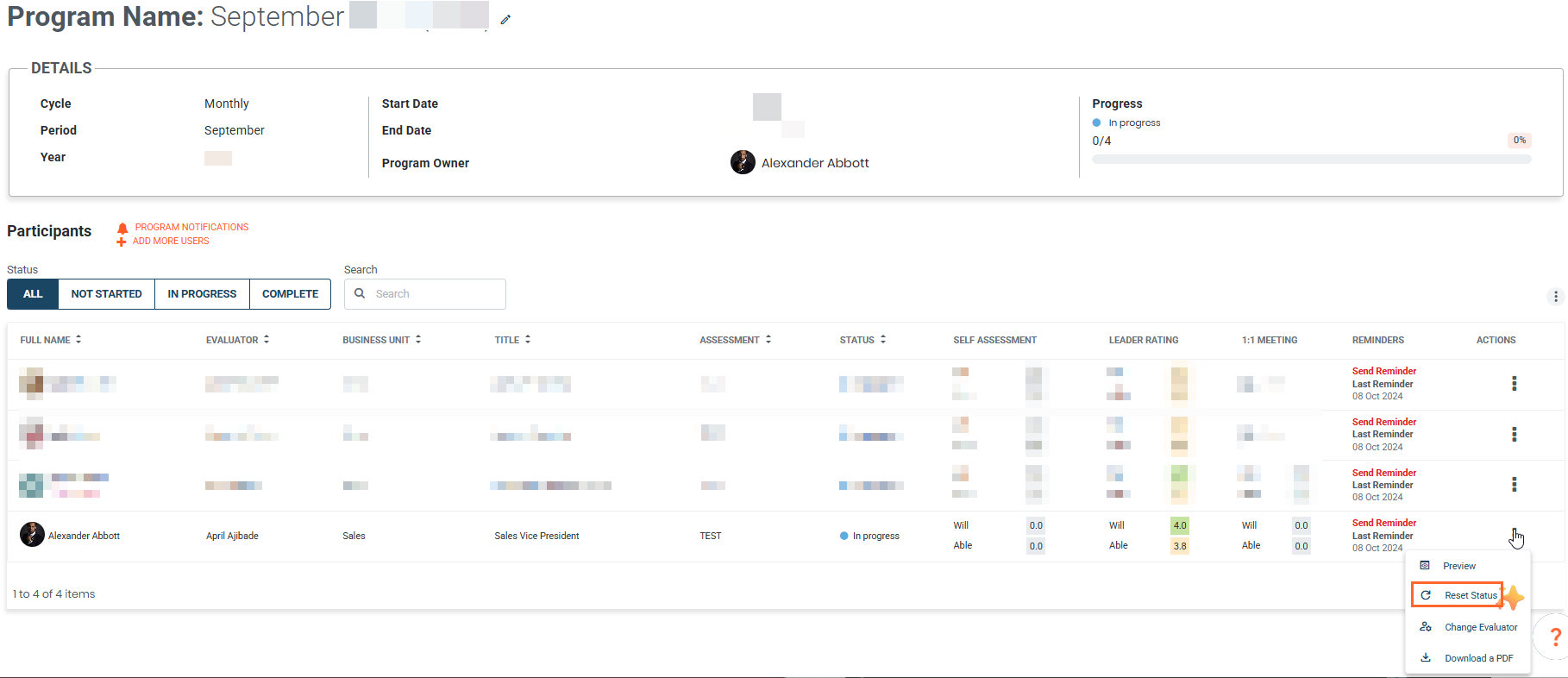
6. Feature Title: Added capability for admins to reset the status of a participant in a program.
Feature Module: Coach
Feature Group: Assessment Program
Feature: Reset program status
Access: Coach > Assessment Programs > for the selected participant > click the kebab menu > reset status
Description: Skillibrium admins can now reset the status of a participant in a program without the need to raise a support ticket.
7. Feature Title: Popup congratulatory message on the completion of course or learning path.
Feature Module: Learn
Feature Group: Training Catalog
Feature: Congratulatory popup message
Access: Learn > Training Catalog > complete a course or learning path
Description: At the completion of a course or learning path, users will see a congratulatory popup message.
BUG FIXES
1. Bug Title: Edit functionalities on Preview popup
Bug Number: BUG-2214
Feature Group: Opportunity
Feature: Content transcription preview
Access: EXECUTE > Opportunity > Content > Click on the content name of an uploaded audio/video
Description: The edit icon appears in the Preview pop of uploaded content transcription.
Applicable Roles: Opportunity owners, Skillibrium admin
Known Issue Release Notes: N/A
Status: Fixed
2. Bug Title: Training added in bulk are not alphabetically ordered
Bug Number: BUG-2155
Feature Group: Training catalog
Feature: Edit/Add training
Access: Learn > Training Catalog > New Course
Description: All training content added in bulk do not display in alphabetical order.
Applicable Roles: Skillibrium admin
Known Issue Release Notes: N/A
Status: Fixed
3. Bug Title: No thumbnail displayed for the quizzes in preview mode
Bug Number: BUG-2142
Feature Group: Training quizzes
Feature: Thumbnails for quizzes in preview mode
Access: Learn > Manage training > click on a quiz
Description: Quizzes in preview mode do not have thumbnail displayed.
Applicable Roles: Skillibrium admin
Known Issue Release Notes: N/A
Status: Fixed